All three exams want JPG files. GATE 2027: photo 200 × 260 to 530 × 690 pixels, 5–600 KB; signature 250 × 80 to 580 × 180 pixels, 3–300 KB. IBPS: photo 200 × 230 pixels, 20–50 KB; signature 140 × 60 pixels, 10–20 KB, plus a thumb impression and a handwritten declaration. NEET (UG): photo 10–200 KB and signature 10–100 KB, with no pixel size set. The GATE, IBPS and NEET presets in Resize image produce files inside these limits.
All the sizes in one table
We took these from each exam's official page or notice on 17 November 2026 and checked the GATE page again on 21 November. Exam bodies change the rules between years, so open the source for your exam before you apply.
| Exam | Photo | Signature |
|---|---|---|
| GATE 2027 | 200 × 260 to 530 × 690 px 5–600 KB | 250 × 80 to 580 × 180 px 3–300 KB |
| IBPS | 200 × 230 px 20–50 KB | 140 × 60 px 10–20 KB |
| NEET (UG) | No pixel size 10–200 KB | No pixel size 10–100 KB |
All files are JPG. IBPS also asks for two more files:
| IBPS file | Pixels | File size |
|---|---|---|
| Left thumb impression | 240 × 240 | 20–50 KB |
| Handwritten declaration | 800 × 400 | 50–100 KB |
Official sources: GATE 2027 photo and signature page (IIT Madras), the IBPS PO/MT-XVI notice (PDF, 30 June 2026) and the NEET (UG) 2026 Information Bulletin (23 February 2026) on the NTA NEET site.
Notice that every exam has a minimum file size as well as a maximum. A photo that's too small is rejected just like one that's too big, and that's the mistake people don't expect.
GATE 2027: the details that cause rejections
- Photo: colour, white background, nothing and nobody else in the picture. Your face should fill 60–70% of it, looking straight at the camera, with forehead, eyes, nose and chin visible. Normal glasses are fine, but not if they reflect light; take them off if you can't avoid the glare.
- Photo shape: a passport shape of 3.5 × 4.5 cm. In numbers, the width divided by the height must be between 0.66 and 0.89. Our preset uses 413 × 531 pixels, which is 3.5 × 4.5 cm at 300 DPI and sits inside every GATE limit.
- Signature: black or dark blue ink, 2.75 to 3.75 times as wide as it is tall, filling 70–80% of the image. Not in capital letters, not initials, and not a digital signature.
- Why it matters: GATE prints this same photo on your admit card and score card, and IIT Madras says a wrong photo can get the application rejected without a refund.
IBPS: four files, each with its own range
IBPS asks for a photo, a signature, a left thumb impression and a handwritten declaration. The pixel sizes are the notice's preferred sizes, and the KB ranges are strict on both ends.
- Photo: 200 × 230 pixels, 20–50 KB, recent, light background, no cap or dark glasses.
- Signature: 140 × 60 pixels, 10–20 KB, black ink on white paper, not in capital letters.
- Left thumb impression: 240 × 240 pixels, 20–50 KB, black or blue ink on white paper.
- Handwritten declaration: 800 × 400 pixels, 50–100 KB, written in English in black ink, in your own handwriting.
The narrow ranges are the hard part. A clean signature on white paper at 140 × 60 pixels usually comes out well under the 10 KB minimum, because there's so little detail in it. Our IBPS preset handles this: when a file comes out under the minimum, it adds an empty comment block inside the JPG until the file reaches it. The picture itself doesn't change. Recent Clerk, RRB and SO notices use the same sizes, but check the notice for the exam you're applying to.
NEET (UG): a KB range and a strict photo
The NTA bulletin sets file sizes but no pixel sizes, so the shape of your photo matters more than its exact dimensions.
- Photo: 10–200 KB, JPG, taken on or after 1 January 2026, colour or black and white, white background. Your face, without a mask and with both ears visible, should fill about 80% of the photo.
- Signature: 10–100 KB, JPG.
- Keep prints of the same photo. You'll need passport-size copies and a 4 × 6 inch postcard-size photo with a white background on exam day, and they should match what you uploaded.
The NEET (UG) 2026 bulletin was published on 23 February 2026. The 2027 bulletin may change these rules, so check it when it's out.
How to make your files
Take the photo against a white wall
Stand about a metre from a plain white wall, facing a window so daylight falls on your face. Ask someone to take the photo with the back camera at eye level, from about 1.5 metres away. Avoid the front camera and flash: they cause shadows and glare. Shoot more than you need, from the shoulders up.
Sign on plain white paper and photograph it flat
Sign in black ink (or dark blue for GATE) on white paper, in the size you'd normally sign. Photograph it from straight above in good light with no shadow from your phone. Do the same for the IBPS thumb impression and declaration.
Crop close
Open Crop image and crop the signature tightly, leaving a small white margin, so it fills most of the picture. For the photo, crop from just above the head to the shoulders so your face fills the share your exam asks for.
Open your exam's preset and pick the file
Open the GATE, IBPS or NEET preset. Under Uploading, choose Photo, Signature or another file, and the size and KB limits are filled in for you.
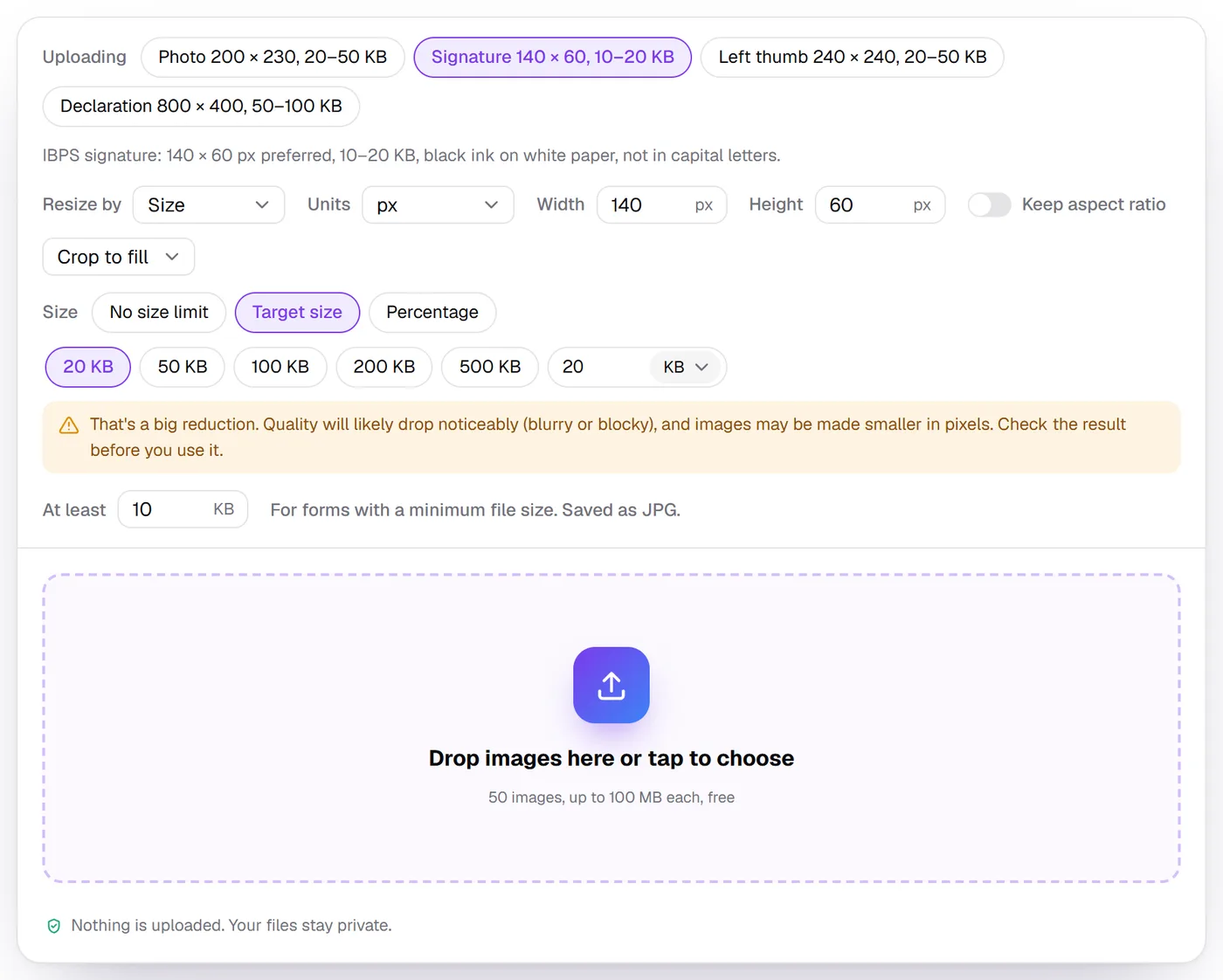
Drop in the image and download
Drop the image in the box. The result shows its new size in pixels and KB. If it's inside your exam's range, press Download and upload that file to the form. Nothing is uploaded to Quikdo; the resizing happens in your browser.
Why forms reject a photo or signature
- Too small in KB. Common with IBPS signatures. Use the exam preset, or set At least in Resize image to the minimum KB.
- Wrong format. iPhone photos are often HEIC, and screenshots are PNG. All three exams want JPG. Convert with HEIC to JPG or PNG to JPG, or just use the preset, which saves JPG.
- Wrong shape. A signature that's almost square fails GATE's 2.75–3.75 width rule. Crop it close first so the image is mostly signature.
- Background not white. A grey or patterned wall can fail GATE and NEET. White background replaces it in your browser, but a photo taken against a real white wall looks most natural.
- Signature in capitals, or initials only. GATE and IBPS both reject these. Sign the way you'll sign at the exam centre.
- Old photo. NEET wants one taken on or after 1 January 2026. A photo from a previous year's form can get you into trouble at verification.
Pixels, cm and KB: what each number means
- Pixels are the picture's dimensions on screen, for example 200 × 230.
- cm or inches only matter for print. They turn into pixels through the DPI: 3.5 cm at 300 DPI is 413 pixels, and at 200 DPI it's 276. Resize in cm does that sum for you.
- KB is the file size. Two pictures with the same pixels can have very different KB depending on how much detail they have and how strongly they're compressed.
Our guide KB vs MB: how to get a photo under 20, 50 or 100 KB explains file sizes in more detail.
FAQ
What is the GATE 2027 photo size?
Between 200 × 260 and 530 × 690 pixels, 5 KB to 600 KB, JPG, on a white background with your face covering 60–70% of the photo.
What is the IBPS signature size?
140 × 60 pixels, between 10 KB and 20 KB, JPG, in black ink on white paper and not in capital letters.
Does NEET set a pixel size for the photo?
No. The NEET (UG) 2026 bulletin sets only the file size (10–200 KB for the photo, 10–100 KB for the signature) and how the photo should look.
My signature is under the minimum KB. What do I do?
Use your exam's preset in Resize image, or set At least to the minimum KB. The file is brought up to that size without changing the picture.
Can I use a photo taken with the front camera?
It's better not to. The front camera distorts faces at arm's length and often adds glare. Ask someone to take the photo with the back camera in daylight.
Are my photos uploaded to Quikdo?
No. The resizing happens in your browser, so your photo and signature stay on your device.